

Have you tackled self-publishing? If you have or plan to do your own formatting, you may have discovered the frustrating path to publication.
Decisions about margins, alignment, typography, trim sizes, and other minutiae lead you to thoughts of strangling your keyboard.
After dipping my toe into the book-writing and self-publishing world, I decided to give Atticus software a try.
Atticus Versus Word Weirdness
My introduction to computers began long, long ago. Before many of you were born. The first computer I tried was through an employer who provided the Apple computer.
Only because Microsoft convinced employers to use Windows everywhere did I make the switch from Apple to Windows. I have used Microsoft’s Word, Excel, PowerPoint ever since.

Formatting
Formatting in Word is as quirky as the Fosbury Flop. For those of you who are too young to know what that is, click on the prior link.
Initially, Word formatting seems weird but after continuous exposure, it becomes mainstream – just like the Fosbury Flop. But if you have tried to copy and paste Word content in almost any other software, it is likely you encountered problems.
Additionally, my attempts to make Headers and Footers work like I wanted was an exercise in futility. Page numbering and alternating headers became a major headache.
So, after researching various software, I landed on Atticus. I used Atticus for formatting only. So, this review is on the Formatting capabilities. I will do another review when I test out its Writing tools.

What is Atticus?
Atticus is a cloud-based software tool designed for writing and formatting books in both digital and print formats. Its site states it was “Made by Authors for Authors.”
I discovered the tool through the owner and creator, Dave Chesson, who is also the founder of Kindlepreneur.
Note: I have no affiliation with either Atticus or Kindlepreneur, other than as a customer.
3 Features I Like About Atticus
The following features are three areas I like about Atticus.
- Cost
- Documentation & Support
- Options
#1 – Cost
What I love most is Atticus has no subscription requirement (looking at you Microsoft 365). Download it at a one-time cost of $147 and use it on Windows, Mac, Linux, or Chromebook.
For comparison purposes, Vellum is available for Mac only and costs $249.99 for ebook and print capabilities ($199.99 for ebooks only).
#2 – Documentation & Support
Atticus has step-by-step tutorials for Writing and Formatting. The tutorials are in both video and text formats. They also have:
- An Atticus Overview
- Advanced Design
- Preparing a Word document (DOCX) for import.
I found the latter extremely helpful when I wanted to import my debut memoir to Atticus for formatting.
I tend to jump in and try to figure things out but that does not always work. So, the step-by-step instructions were very helpful. It would also help if I practiced more patience. 
If I could not find documentation on a specific issue, I contacted Atticus and found their support really responsive.
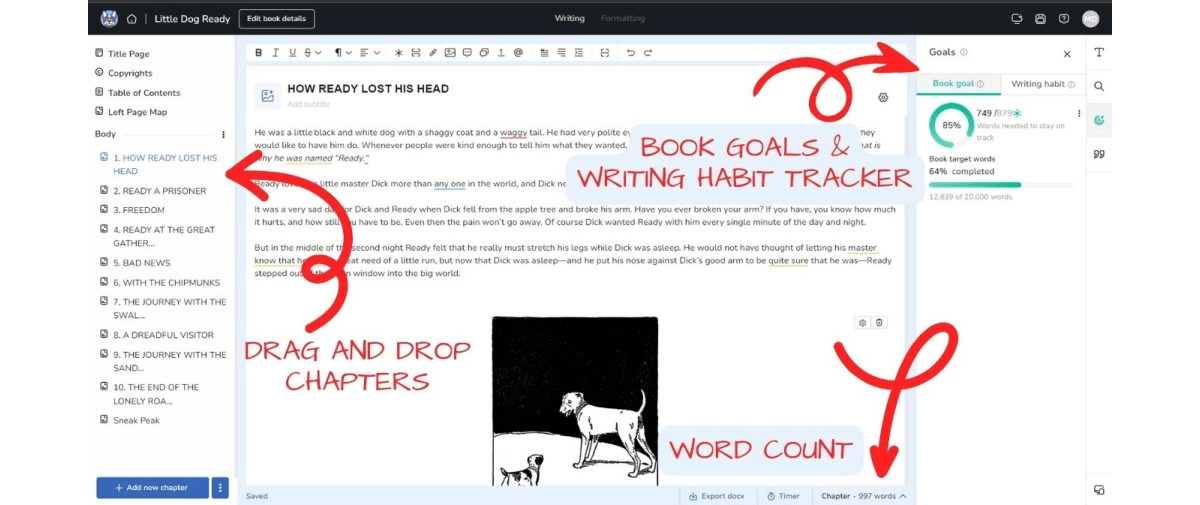
Credit: Screenshot from Atticus website
#3 – Options
Atticus offers a comprehensive collection of formatting tools, including the following.
Typography options for font, font size, line spacing – it even has an option for large print
Chapter Heading options for titles, subtitles, font/font sizes, alignment, and the option for a chapter heading image.
Paragraph options such as drop case or small caps for the first sentence, indentation, and spacing.
Print Layout options include margins, alignment, and what they call layout priority. It allows you to decide if you want to prevent stray sentences from lining up at the top or the bottom of a page or you can select a visually even look.
Other options include trim sizes, scene breaks, and optional placements for footnotes. There are many available choice features throughout the software.
Other Cool Features
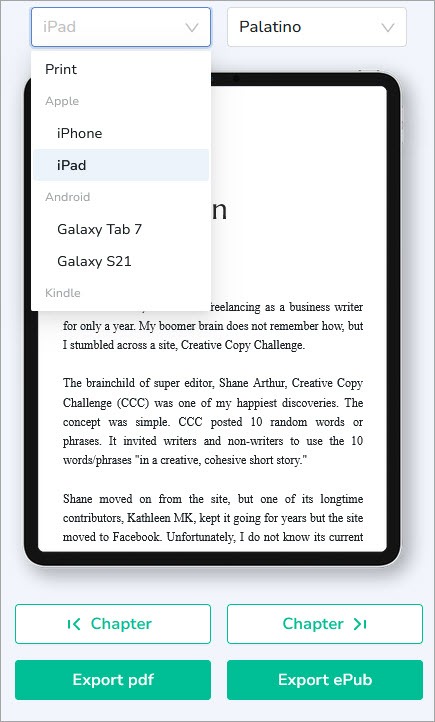
Preview – Atticus offers a preview of your book in different reading devices like the Kindle, iPad, phone, or print.
Exporting – Your finished book takes just a click of a button to export it as a pdf or ePub format.
Importing – I mentioned importing the DOCX (Word) formatting. Be sure to follow their tutorial step by step or it will have a lot to fix. I see that as a Word problem, rather than Atticus.
Themes – Atticus has 17 pre-built themes for design (all customizable) with over 1,200 unique combinations. It also has an option to create your own from scratch.
Front and Back Matter – You can plug in pre-made pages, such as title or half title pages, copyright and dedication pages, table of contents, appendix, author bio, and more.
Cloud Backup – Atticus is cloud-based, which means you automatically have backup of your hard work. However, you do need to be online to log in or export your book.
The site has an app you can download to your desktop, but you must use Google Chrome to do it. I have read complaints that it does not work but I did not try it (mostly because I do not use Google Chrome – long story).
The site also has an app for iPhone and Android phones. Personally, these boomer eyes hate working on a phone for designing.
But as one who hates to follow the crowd, I love that nearly any Atticus feature is completely customizable.
What I Found Challenging
To be fair, that impatient tendency of mine and leaping in feet first may be the reason for my stumbles. So, my stumbles may be unique to me.  Here is what tripped me up.
Editing Locations – The location for making specific changes to the content or look was not always intuitive. For example, I decided I wanted to use a different Copyright template.
For the life of me, I could not find where that option was located. I would think it would follow the Copyright category at the top of the Dashboard. Instead, it is after the Add new chapter button at the bottom. 
I ended up creating my own cheat sheet for my confused boomer brain. You can download it (by clicking on the prior link) if you think it would help you.
Missing Features – Some of these features fall more into a “would be nice” feedback as opposed to a deal-breaker (at least for me).
Writing Tools – I would like to have some word processing tools like spell check.
More Font Options – It would be nice to be able to upload our own fonts and be able to change font colors for illustrated books.
Some reviews I looked at complained about slow response times as Atticus is web-based. I have not had that problem. And another complaint is major problems with trying to work offline.
Atticus Review Recap
At a minimum, Atticus beats the heck out of Word for formatting. I love having all the options and I found it reasonably priced.
I have used it for three books so far. The most challenging one was a digital guide I wrote for newbies to the 60-Mile, 3-Day Walk for the Cure. (I also have a pdf format for the guide).
I found working with images difficult. However, that may be my issue rather than a problem with Atticus.
I finally got the hang of it, but I was not crazy about the look. It is a free guide and I was not sure if it is a problem with ePub formats or the user. Probably the user. 
My bottom line, I like working with Atticus and have not regretted the purchase. As I continue working with it, I will let you know how this review changes.
Have you used Atticus? If so, what do you think? Leave your feedback in Comments.
Helpful article and I’d probably check out Atticus if I planned any more books. The one I’m about to release will be formatted by a company I’ve used before that is reasonably priced & does excellent work.
Hi, Maryann. Hey, if you can get someone else to do it, all the better. 🙂 I owe a follow-up post to this one covering the formatting aspect from scratch. There are a few big caveats that I am not particularly happy with.
Thanks for visiting, Maryann.